
Setting up new worktrees
A fresh worktree has the repo's tracked files and nothing else: no node_modules, no .env, no tools installed. Heed
sets every worktree it makes up the same way, for sessions from Start work and for get it green's
background runs alike.
Setup is a list of commands a new worktree runs in its pane before the agent starts. The agent starts only when every one of them passed; a failure says what failed and which agent to run again, and leaves the pane at your shell:
heed: setup failed (pnpm install); fix it, then run the agent again: claude
Setup commands are sh: they run under sh -c whatever your login shell is, and the agent then starts in your own
shell, in its syntax.
A background run whose setup fails ends as failed, with that reason, instead of an agent working in a broken tree.
Heed proposes setup from what it finds in the repo's main checkout, and runs nothing until you approve it:
- mise. A repo with
mise.toml(or.mise.toml,.config/mise.toml,.config/mise/config.toml) getsmise installalone: it installs the repo's tools and runs itspostinstallhooks, which install the rest. - Lockfiles, otherwise:
pnpm-lock.yaml→pnpm install,bun.lock→bun install,package-lock.json→npm ci,yarn.lock→yarn install,uv.lock→uv sync,poetry.lock→poetry install, a.slnor.csproj→dotnet restore. Cargo and Go fetch when they build, so they get nothing. One install at the root covers a workspace.
Git hooks need nothing of their own: they live in the repo's shared git directory, and husky's per-worktree setup runs
from the package install's prepare.
In Repos (gr), a repo with a proposal waiting shows it under the table. S (:setup.review) asks: y approves it,
e edits it in Settings, x never runs any setup there and stops the proposal.

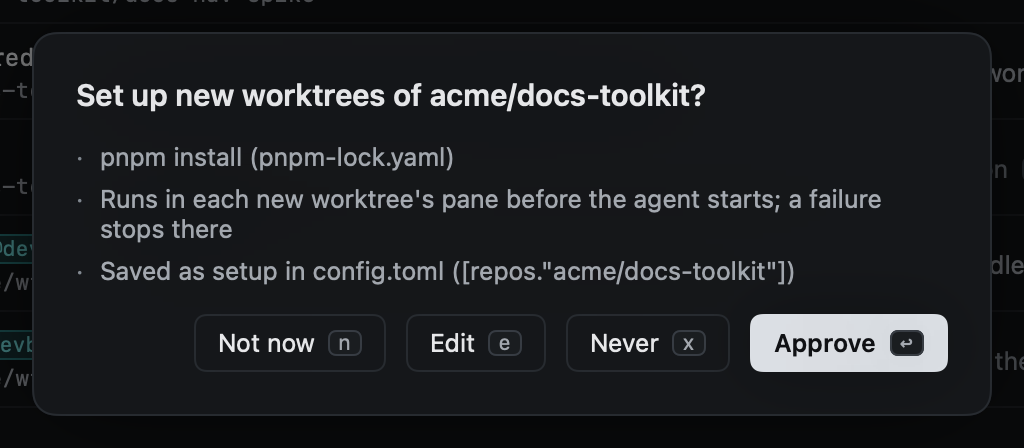
Approving writes the commands to config.toml; never writes an empty list. Set them by hand there, or in Settings ›
Orgs & repos › General (an advanced setting: turn on Show advanced, or search for setup), per repo or for a whole org:
[repos."acme/docs-toolkit"]
setup = ["pnpm install", "pnpm build:icons"]

[orgs.acme]
setup = []
- no setup, and no proposals, for the org's repos that do not set their own
| Command | |
|---|---|
:setup.review |
The repo's detected setup: approve, edit or never (S in Repos) |
:setup.approve |
Approve the detected setup |
:setup.never |
No setup for the repo, and no more proposals |
:setup.edit |
Settings › Orgs & repos, on the repo's General tab |
A .worktreeinclude file at the root of the main checkout names files to copy into each new worktree, in .gitignore
syntax. Only files that git ignores are copied, never tracked ones, and a file the worktree already has is left alone:
.env
.env.local
config/*.secret.json
The same file other tools that make worktrees read. It works on hosts too, from the host's checkout.
Claude Code asks whether you trust a folder the first time it starts in one, and it asks for the repository's main
checkout, which every worktree of it shares. The first time heed starts Claude in a repo of this Mac that is not
trusted yet, it offers once to trust it ahead of time: yes sets hasTrustDialogAccepted for the main checkout in
~/.claude.json, as Claude's documentation describes, changing nothing else in the file (heed keeps a copy of it the
first time, as ~/.claude.json.heed-backup). Your home folder is never trusted this way.
A repo whose mise config sets [env] is not loaded until mise trusts it; the same offer, for any agent, runs
mise trust for its main checkout, which covers its worktrees too.
The offer says what trusting turns on, read from the repo: the hooks in its .claude/settings.json (with their
commands, and its status line or key helper command) and the MCP servers there and in .mcp.json, for Claude; the
variables mise's [env] sets (by name, never their values), the files _.source, _.file and _.path name, a value
that runs a command, and mise's [hooks]. A file heed cannot read is named, to look at before you trust.
[worktrees]
offer_trust = true
- false: never offer