
GitHub mirror
A goal lives in heed, but the people around it do not all use heed. The mirror puts the goal on GitHub for them to follow along: one issue for the goal, and a sub-issue for each of its items, in a repo of the team's choosing. heed keeps them up to date on its own; what colleagues do there comes back to you as questions, never as changes.
Each goal mirrors to its own tracker repo, which does not have to be a repo the work happens in: a team's planning
repo, say, while the PRs land in three others. The new goal dialog fills it in from config, and you can change it
there or later; one that is not org/name is said under the field, and ⌘↩ waits until it is fixed or cleared. Settings sets the default in Goals › GitHub mirror (Tracker on GitHub), and one per org or repo in
Orgs & repos (Goal tracker, on the General tab under Goals; a repo's wins over its org's):
[goals]
tracker = "acme/planning"

[orgs.acme]
goals_tracker = "acme/planning"

[repos."acme/docs"]
goals_tracker = "acme/docs-planning"
- any goal, when no org or repo below names one
- goals whose work is in acme's repos
:goal.tracker org/name sets a goal's tracker; :goal.tracker none takes it off. Before a tracker is taken, heed
checks it with a read: the repo exists, has issues turned on, is not archived, and you have triage access or more
there (sub-issues and closing need it). A tracker that fails the check is not set, and the overview says why.
Changing a goal's tracker starts the mirror over in the new repo. The issues in the old one stay as they are.
Mirroring publishes, so it is off until you turn it on for a goal: M (goal.mirror) on the goal, in Goals. Turning
it on is the one confirmation: from then on heed writes to the tracker on its own, and M again stops it (the issues
stay as they are). Mirror new goals in Settings › Goals turns it on for new goals from the start, and Orgs & repos
(General tab) sets it per org or repo:
[goals]
mirror = false
mirror_label = ""                  # a label for heed's issues, e.g. "heed-goal"; never required

[orgs.acme]
goals_mirror = true
- new goals mirror from the start
The meta issue has the goal's title, and a body rendered from GOAL.md: the goal, what it is not, the done-when
checklist with the evidence for each criterion met, the decisions and open questions, the quality bars with the
current scores, and the PRs on the goal in any repo. A footer says heed maintains it, and an invisible marker
(<!-- heed:goal <id> -->) lets heed find it again.
A sub-issue per item, made in the tracker and attached to the meta issue with GitHub's sub-issues, so GitHub shows
the goal's progress on the meta issue. Its body says where the item stands and its PRs, and carries its own marker
(<!-- heed:item <id> -->). A sub-issue closes when its item reaches Done, with a comment naming the evidence (the
merged PR, or that it was moved by hand), and reopens if the item moves back. The meta issue closes when the goal is
done or archived.
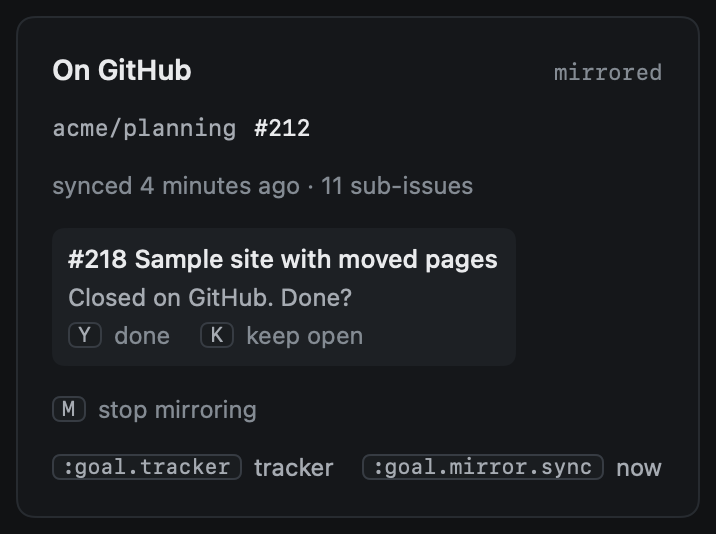
Items show their sub-issue number on the overview's matrix and on their card; the overview's On GitHub panel
shows the tracker, the meta issue (click it, or :goal.mirror.open, to open it), the last sync and anything that went
wrong.
heed is the source of truth. On each of heed's GitHub syncs, it renders what the issues should say and compares that with what it last wrote; only the differences are written: a new issue, an edited title or body, a close or reopen with its comment, a sub-issue attached. With nothing new, a sync makes no GitHub call at all.
- Never twice. Before making an issue, heed searches the tracker for the goal's markers and takes back any issue it made before (on another Mac, or before its store was restored), so nothing is made twice.
- Never deleted. heed only makes, edits, closes and reopens issues. Turning the mirror off or changing the tracker leaves the issues where they are.
- A little at a time. A sync makes at most 20 writes, a second apart (GitHub limits bursts of new content); the rest go on the next sync, and the panel says how many are left.
- In the log. Every write is a GitHub write row in
:log(callergoals.mirror), with the issue body left out.
:goal.mirror.sync syncs a goal now, and reads it back.
Every few minutes (five times heed's GitHub poll interval) heed reads back what changed in the tracker, cheaply: one call for the issues updated since the last look, and one for the meta issue's comments when it changed. What it finds becomes asks and proposals; the goal itself never changes because of something on GitHub.
- A colleague closes a sub-issue whose item heed has open: heed asks whether the item is done, in the panel and in
Attention. Yes (
Yon the goal,yin Attention) moves the item to Done; no (K,n) keeps it open, and heed reopens the sub-issue. Until you answer, heed leaves that sub-issue's state alone. - A colleague reopens a sub-issue whose item is done: heed asks whether it is not done. Yes moves the item back to Working; no closes the sub-issue again.
- A comment on the meta issue is read by the GOAL.md proposer (a cheap model call, within the goal's daily
budget), and what it suggests, an open question or a decision, waits in
GOAL.mdfor you like any other proposal. Over the budget, the comments wait for the next day; with[llm]off, they are not read. heed's own comments are never read back.
| Command | Key | What it does |
|---|---|---|
goal.mirror |
M |
Mirror the goal (after checking the tracker); again: stop |
goal.tracker [org/name\|none] |
Set or change the goal's tracker repo | |
goal.mirror.sync |
Sync the goal's issues now and read them back | |
goal.mirror.open |
Open the meta issue, or the sub-issue of the card under the cursor | |
goal.mirror.yes |
Y (y in Attention) |
Yes to a colleague's change: the item follows it |
goal.mirror.no |
K (n in Attention) |
No: heed keeps its way and puts the sub-issue back |