Start work
o opens Start work. Describe the task; Heed picks the repo, names the branch, makes the worktree, opens a session and
starts the agent on your words.
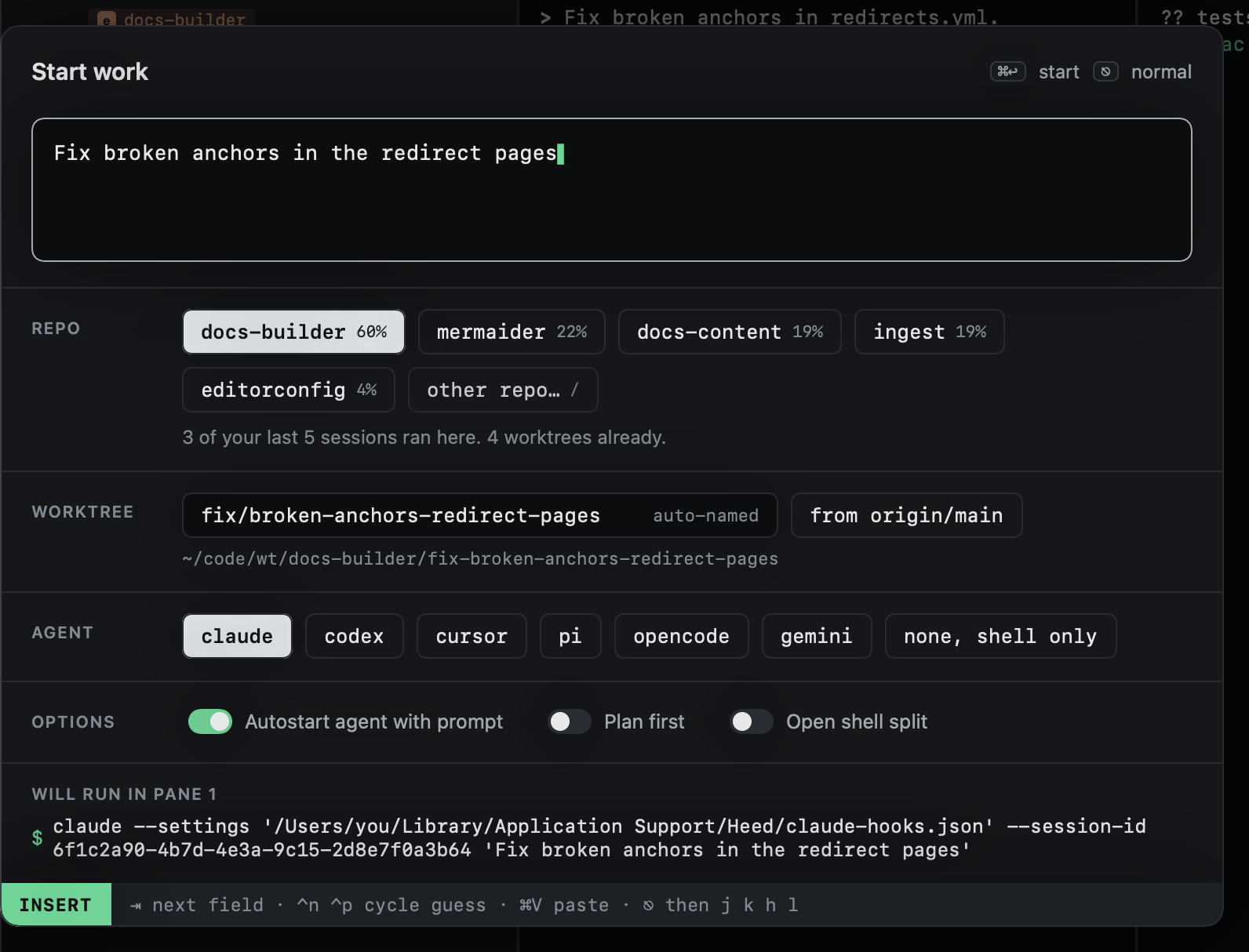
The dialog has its own small modes, like Heed itself:
- Typing (INSERT, the default): keys go into the prompt or the worktree name.
⇥moves to the next field. - Moving (NORMAL, after
⎋):jkor⇥move between fields,hlchoose within one,spacetoggles,ior↩edits again.
| Key | |
|---|---|
⌘↩ |
Start |
⌃n / ⌃p |
Cycle the repo guess (or the agent, on the agent row) |
⌘V |
Paste into the prompt |
⎋ |
Stop typing; again to cancel |
| Field | |
|---|---|
| Prompt | What you want done. It grows with what you type, up to a third of the window, then scrolls. |
| Repo | The guessed repo, and any others for a cross-repo session. See Choosing repos. |
| Worktree | The branch and folder name, from your first word. See Branch names. |
| Agent | Which agent starts, or a shell only. See Agent and options. |
| Options | Autostart, plan first, shell split. |
The bottom of the dialog shows the exact command the agent pane will run.
- From anywhere:
⌃⌥Spaceopens it over any app. - From GitHub:
son issues or inbox items starts a session from them. - Starting again:
Ostarts from a previous session's prompt.