The command line
: opens the command line. Every command has a name, and : runs any of them, with completion.
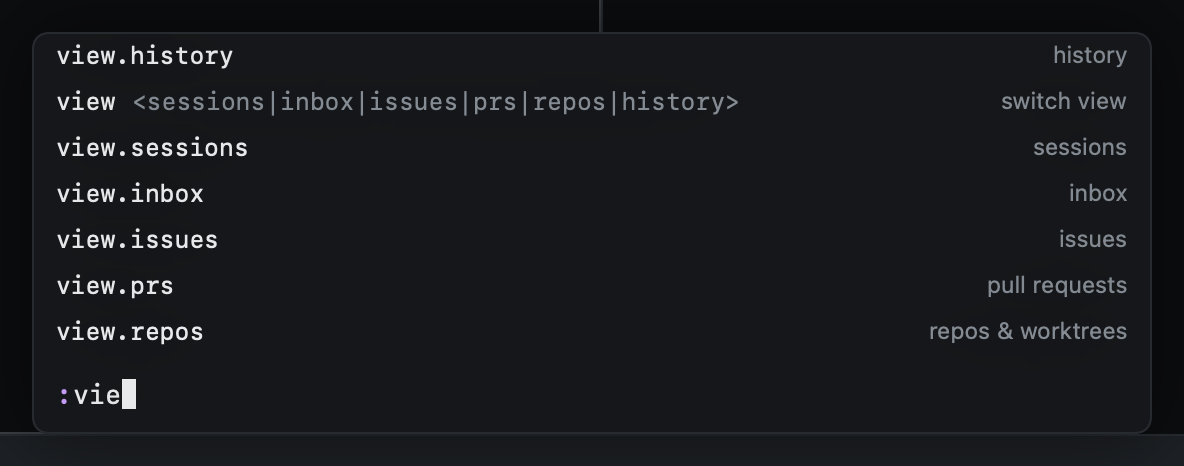
| Key | |
|---|---|
⇥ |
Complete |
↩ |
Run |
⎋ |
Close |
Short forms work too:
| Typed | Runs |
|---|---|
:start <prompt> |
Start work with that prompt |
:agent codex |
Start work with that agent |
:pr 2841 |
Read pull request 2841 |
:track <url> |
Track a pull request in this session (gU takes the URL on the clipboard) |
:wt sweep |
Run the cleanup sweep |
:inbox, :prs, … |
Switch view |
:import <path> |
Import the worktree at a path |
:tutor [lesson] |
The tutor's picker, or a lesson by name |
:back, :skip |
In the tutor: the step again, or skip it |
:help |
Every key |
:q |
Quit (in the tutor: leave the tutor) |
Everything you can do with the mouse, the menu bar or a global shortcut is a command too, so : reaches it and
config.toml can bind it:
| Command | |
|---|---|
:session.open <words> |
Go to the first session matching the words |
:tab.go <n> |
Go to tab n |
:filter.clear |
Clear the view's filter |
:issues.repo [name] |
Show one repo's issues; no name shows every repo |
:resume |
The "pick up where you left off" dialog, as on launch |
:work.start.panel |
Start work in the floating panel |
:settings.open [section] |
Settings, on general, agents, colors, cleanup or keys |
:app.activate |
Bring the window to the front |
:repo.add <path> |
Add a repo outside the scanned folders |
:cleanup.rules |
Show the cleanup rules |
The key reference lists every command name.