1. Home /
  2. Sessions

Filtering

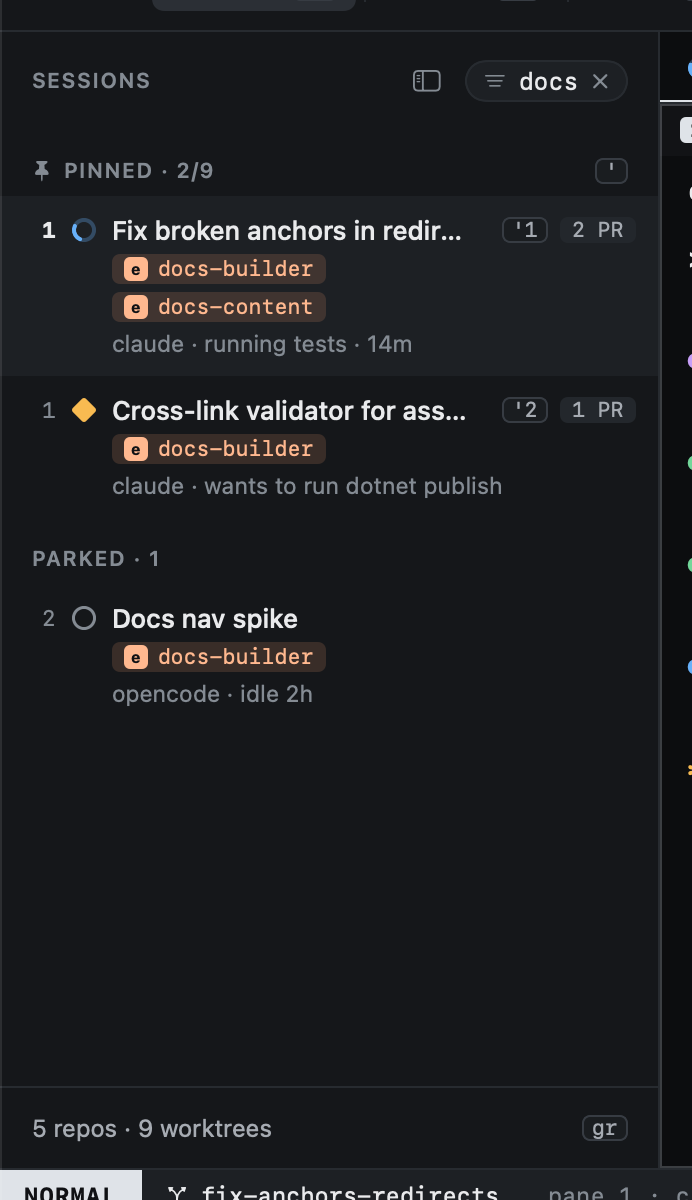
/ filters the sessions list. You type in the status bar; the sidebar shows the filter as a pill and narrows as you type.

Typing a filter: /docs in the status bar, with the number of matches

The kept filter: only sessions matching docs, the pill showing it

Every word you type must appear somewhere in the session: its title, branch, agent, repos or pull request numbers. docs fix finds a docs-builder session on a fix branch.

Key
↩ Keep the filter and stop typing
⎋ Clear it
⌃w Drop the last word
⌃u Clear what is typed

Clicking the pill's ✕ clears it too. Every list view filters the same way, each keeping its own filter.

Previous
Resuming sessions
Next
Start work
  • View as Markdown
  • Edit this page
  • Home

  • Getting started
    • Installation
    • The first run
    • The tutor
    • Your first session
  • Concepts
    • Sessions
    • Agent states
    • Worktrees
    • Modes
  • Sessions
    • The sidebar
    • Moving around
    • Typing into agents
    • Panes and tabs
    • The inspector
    • Pin, park, close, delete
    • Resuming sessions
    • Filtering
  • Start work
    • Choosing repos
    • Branch names
    • Agent and options
    • From anywhere
    • From GitHub
    • Starting again
  • Agents
    • Hooks
    • Reading the screen
    • Custom agents
  • GitHub
    • Inbox
    • Issues
    • Pull requests
    • Reading PRs and issues
    • Review feedback
    • Tracking PRs
  • Worktrees
    • Repos
    • Importing
    • Removing
    • Cleanup
  • Diff
    • Reviewing changes
  • History
    • Reopening
  • Keyboard
    • Views
    • Hints
    • The command line
    • Selecting
    • Mac shortcuts
    • Customizing keys
    • Key reference
  • Outside the window
    • The menu bar
    • The Dock
    • Global shortcuts
  • Configuration
    • Settings
    • config.toml reference
    • Finding git and gh
  • Reference
    • The heed CLI
    • Files and locations
    • Environment variables
  • Troubleshooting