
Items and the board
A goal's work is split into items. Few of them are typed in: heed finds them in the goal and in the work on it, and where each one stands follows from evidence (a session working on it, a review, a benchmark, a PR, a merge), never from ticking a box.
| Source | What | How |
|---|---|---|
| You | An item or a question, by hand | a (or n) on the board, or :goal.item.add <title>; a title ending in ? is a question |
| Planner | GOAL.md broken into planned items |
On a new goal, and on each version that changes the goal, what it is not or when it is done; :goal.plan asks now |
| Sessions | A follow-up in the ledger entry of a session on the goal | When the entry is written; matched against the items the goal has, and kept with how sure heed is that it is new |
| Chats | A question in a chat on the goal | When the chat closes: the question lands in To explore |
| PRs | A PR on a branch of the goal's sessions, or linked to an item | Automatic: it moves its item to Verify, and to Done once merged; a PR with no item gets one |
| Sources | A PR or issue a GitHub query of the goal finds | On heed's GitHub sync: one item per match, done by the source's rule (Item sources) |
A title found in the work is compared with the goal's items first: much alike is the same item, nothing alike is a new one, and in between a cheap model call decides. Every item records where it came from and why.

The overview's Implementation state shows each item through its stages: plan, plan review, built, code review,
perf, DX, PR and merged. A stage is ✓ done, ◐ in progress, ! an issue, ○ not yet, or · not needed for this goal. The
newest evidence of a stage decides it, and a later stage implies the ones it cannot happen without: a merged PR means
the PR and the build are done. Hover a mark for the evidence behind it. A click on a row shows the item on the board.
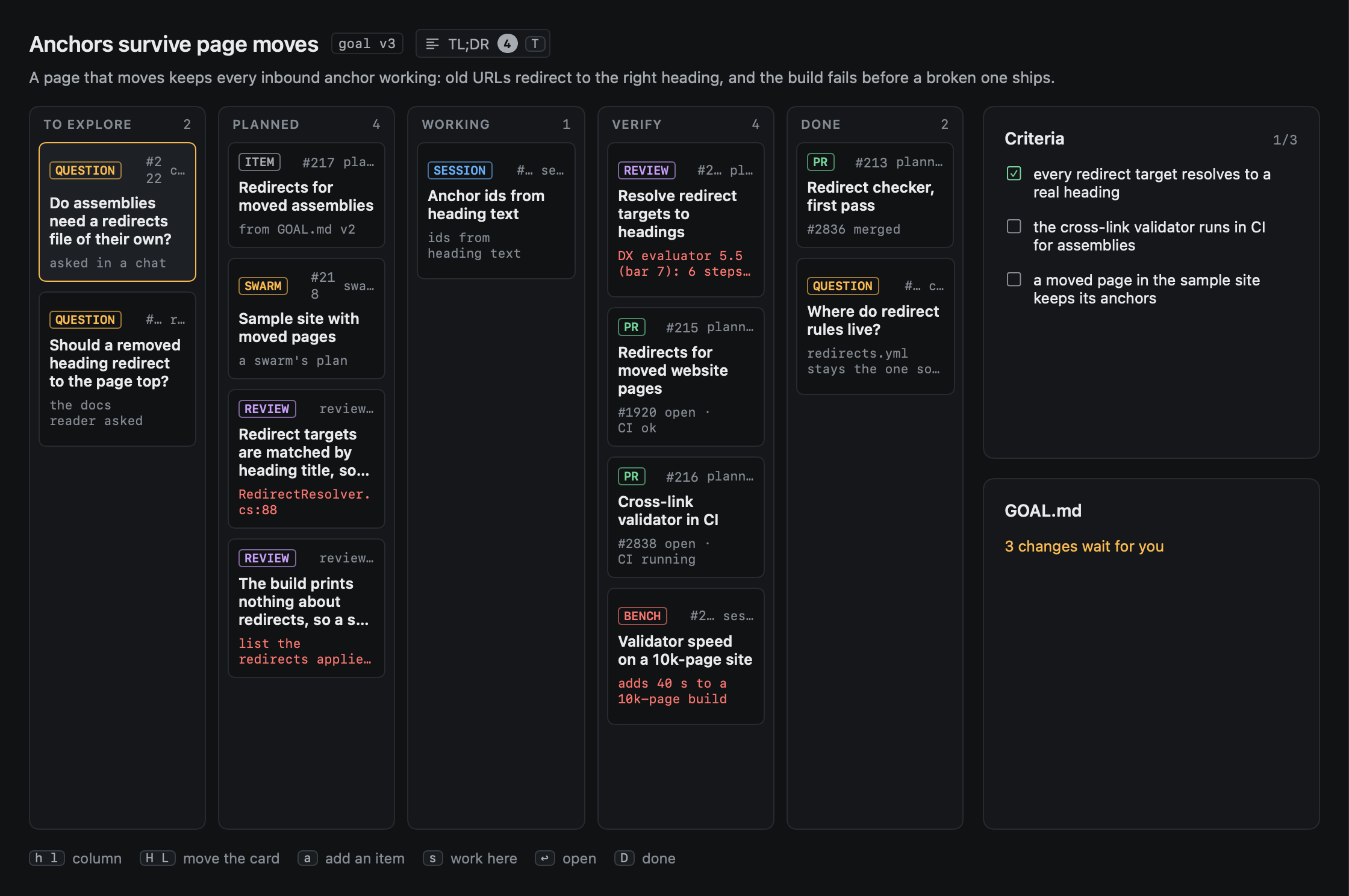
B shows the goal as five columns: To explore (questions and what nobody has planned), Planned, Working
(a session on it, something being built), Verify (a PR, or built work under review) and Done (merged, or a
question a decision answered). Cards wear what they mostly are: session, chat, PR, question, review, bench or swarm.
| Key | |
|---|---|
h l |
The column left or right |
j k |
The card above or below |
H L |
Move the card a column left or right |
a n |
Add an item, in the column under the cursor |
s o |
Work here: Start work filled in from the item; the session goes on the goal, on that item |
↩ |
Open what the card is: its PR, its session or chat; a question opens GOAL.md |
D |
Done |
- |
Split it into smaller items (:goal.item.split a; b) |
A card moved by hand, by key or by dragging it to another column, stays there until newer evidence about it arrives; then the evidence decides again. Right-click a card for the same actions, and Move to any column.
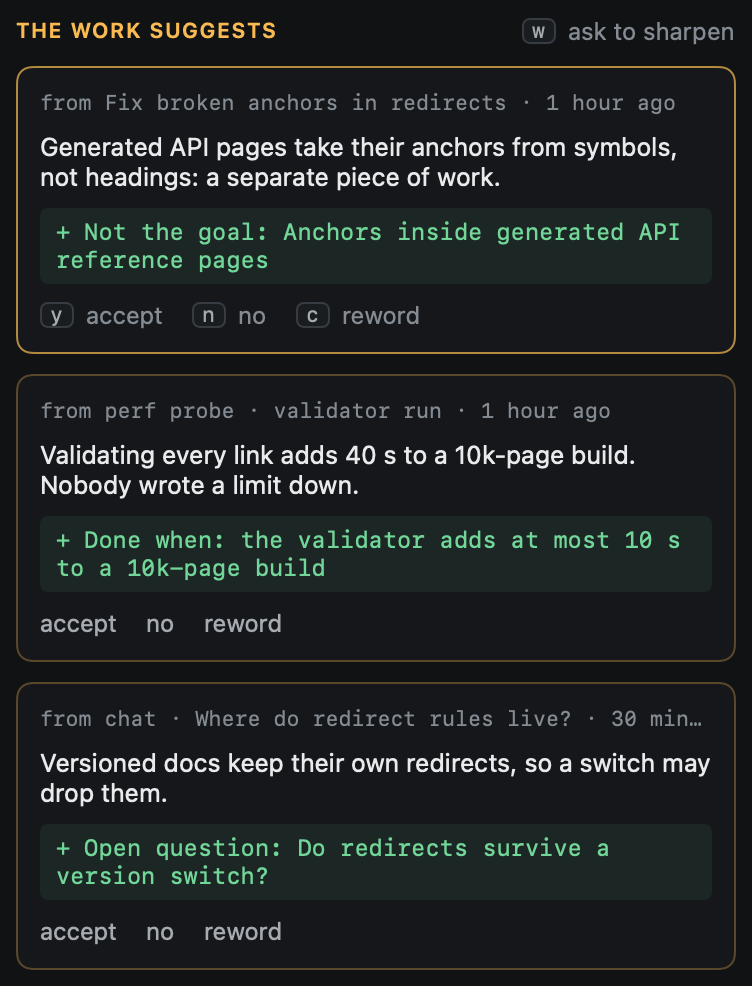
When a ledger entry of a session or chat on the goal is written, what it found goes into GOAL.md:
- Edits that only record what happened apply themselves, each as a new version you can undo (
u, or undo beside the version): a decision taken, an open question answered, a criterion met with its evidence. - Edits that change what the goal is wait for you: a new criterion, a new non-goal, a new open question, a reworded
goal. They show beside
GOAL.md, and the goal gets one item in Attention however many there are.
A cheap model call reads each entry against GOAL.md for more such edits; whatever it calls them, heed decides which
kind an edit is. In GOAL.md, y accepts the first change waiting, n says no and c rewords it first; each card
also takes a click, and a right-click. w asks a model to sharpen the goal: everything it suggests waits.
Model calls are made only with [llm] enabled, through heed's usual daily cap, and at most six a day per goal for the
planner, the proposer and sharpening together.
A goal with changes waiting is one Attention item ("3 proposals"); ↩ opens its GOAL.md. Rules match it by
proposals, reason goalProposals or kind goal:
[attention]
rules = ["proposals boost 2"]