
Bigger than one session
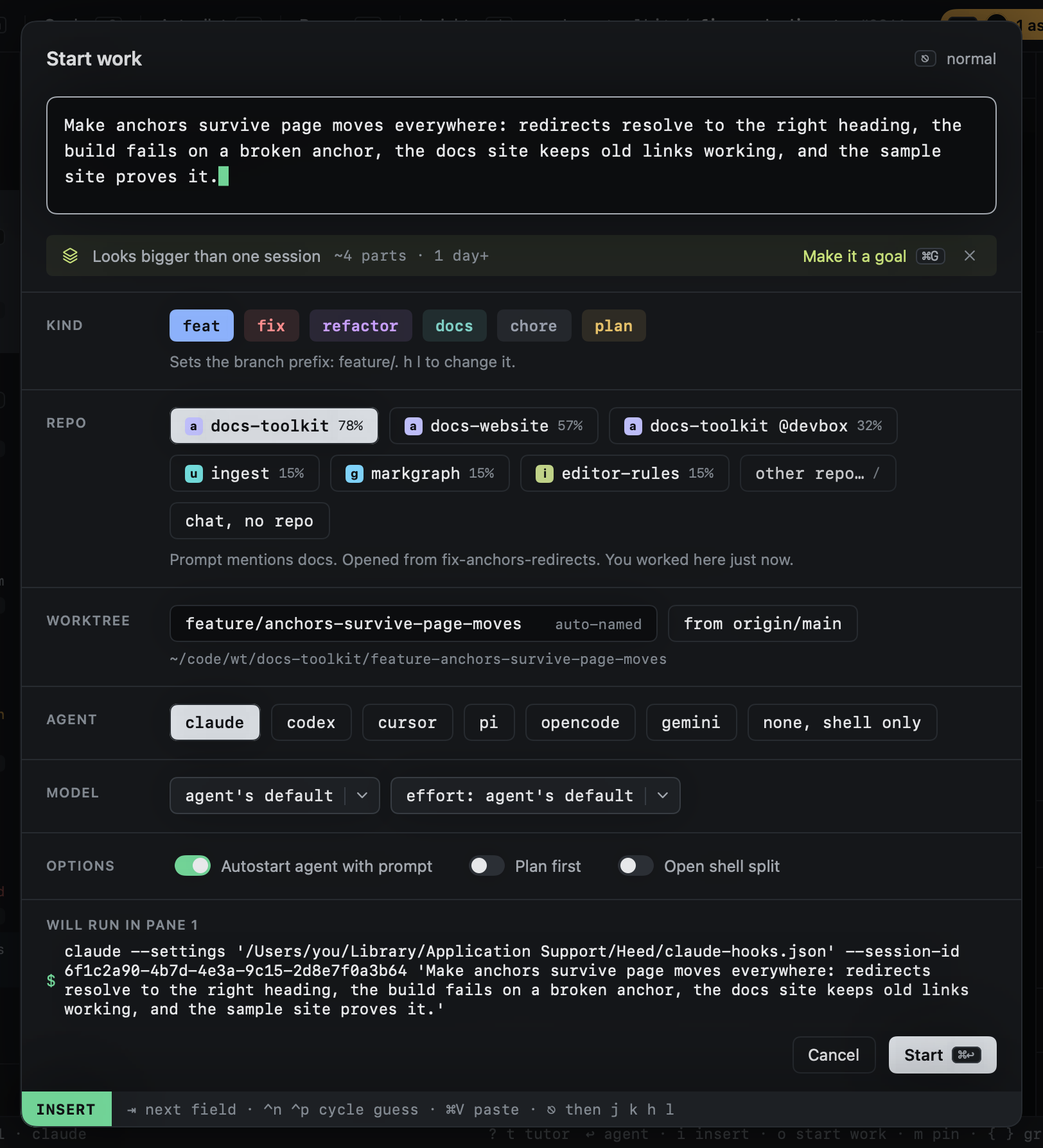
Some prompts are more than one agent in one worktree should take on. While you type a longer prompt (twelve words or more), Start work sizes it once typing pauses. When the task looks bigger than one session, one line appears under the prompt: the rough size (parts and how long one agent would take), Make it a goal and a ✕. The fields stay where they are, and nothing starts by itself.
| Key | |
|---|---|
⌘G |
Make it a goal: the goal is made from the prompt and its wizard opens on the first step, the plan |
⌘↩ |
Starts what the fields show, as always: the repo, agent and worktree you filled in |
The ✕ puts the line away for this prompt; it comes back only for a different one. Ignoring it costs nothing.
Small tasks never see any of this: a short prompt is not sized. A chat, a promotion and the tutor are never sized.
First a decision, from the decider you set up: Apple's on-device model or Hunch where they answer, a model call behind them. It picks one of chat, session or goal. Only when a goal looks likely does one cheap model call follow, through heed's model calls, for the rough size and a title for the goal. Both count against the daily cap. When decisions are off, or the call fails, Start work starts as it always did.
Turn it off in Settings › Start work › Size the task, or in config.toml:
[start_work]
size_check = false
A session that turns out bigger than it looked can still become a goal later.