
Get it green and merged
heed watches the PRs your sessions track. It follows their checks and reviews and sends what holds a PR back to its
agent (green). Once a PR is green, heed merges it (merge). Autopilot's Now (gw then N) shows
the PRs as heed works on them. This page explains how each part works and how you set it.
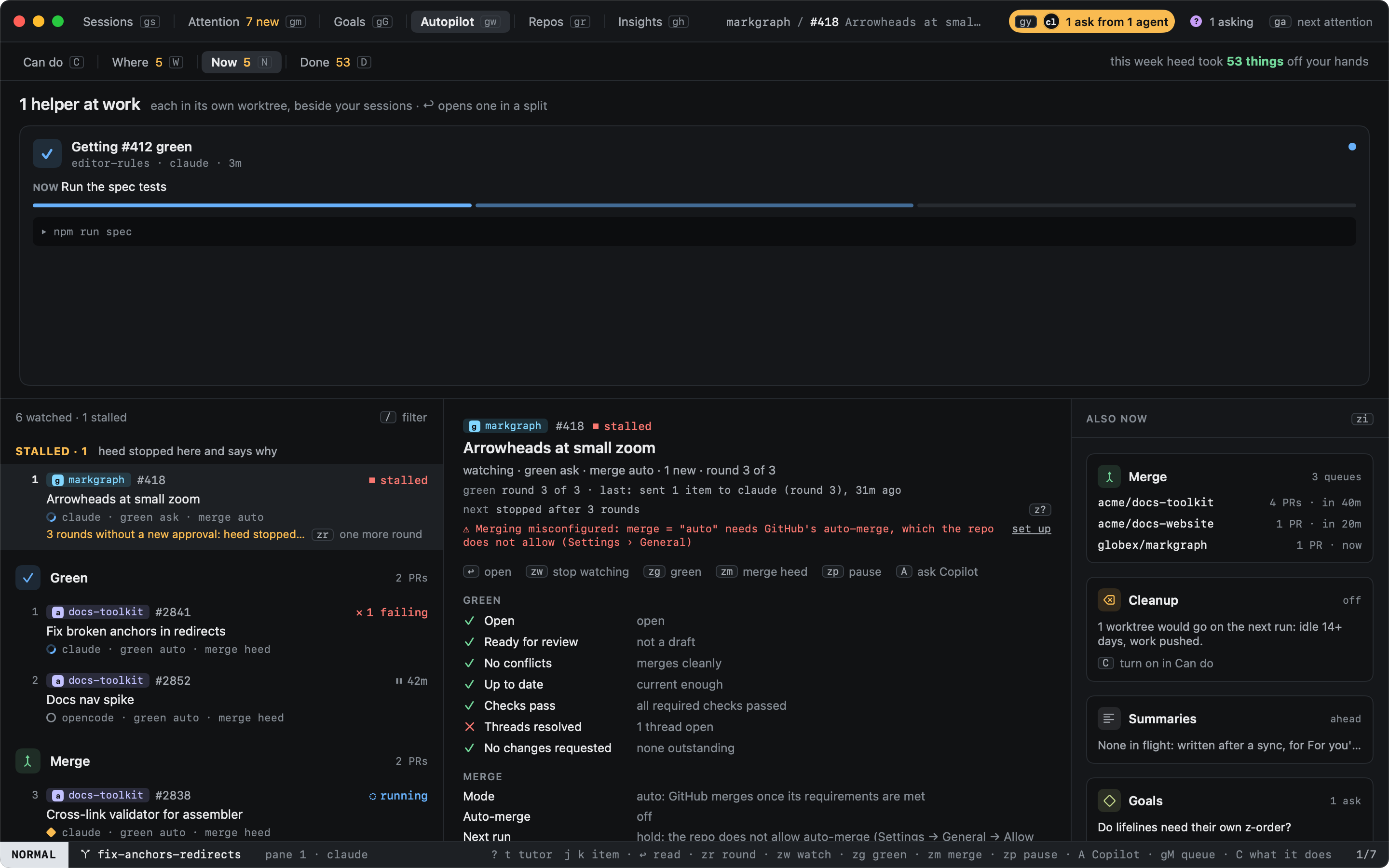
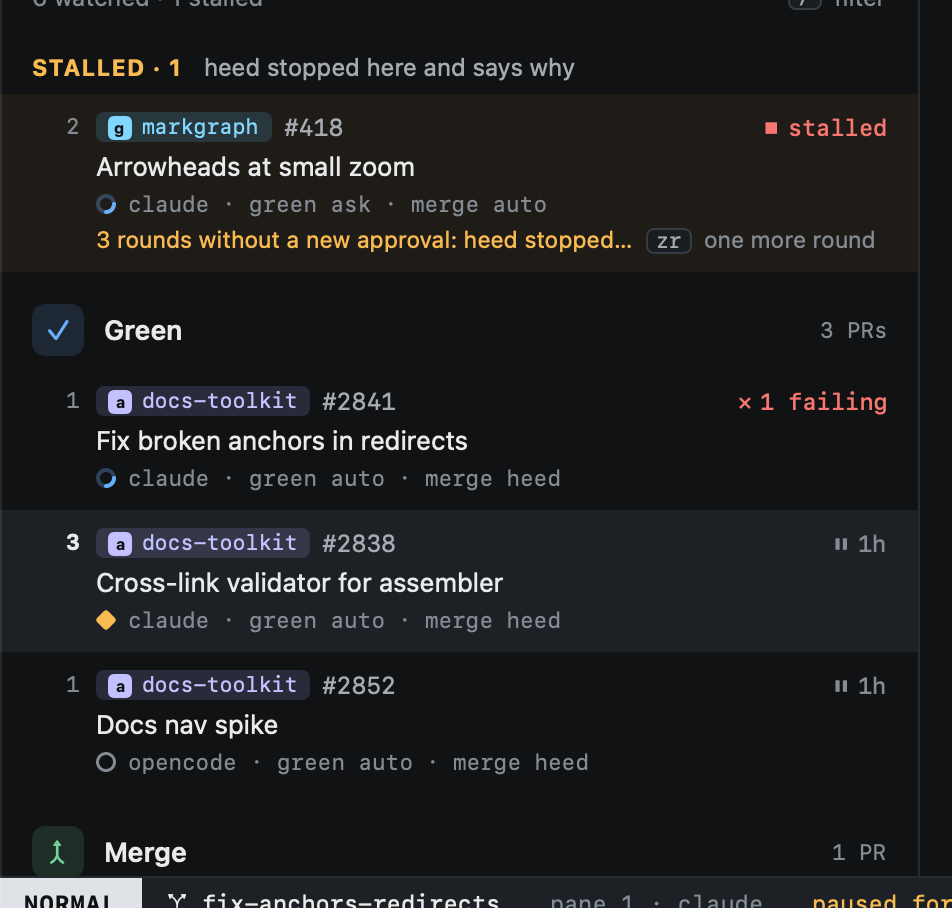
- Left, the PRs by card, stalled first: Stalled (out of rounds: see below, or feedback with no session to send it
to), Green (being fixed, with the rounds used), Merge (merging on, and what the next run does), Copilot (asked)
and Not watched. Autopilot's Done lists merged and closed PRs.
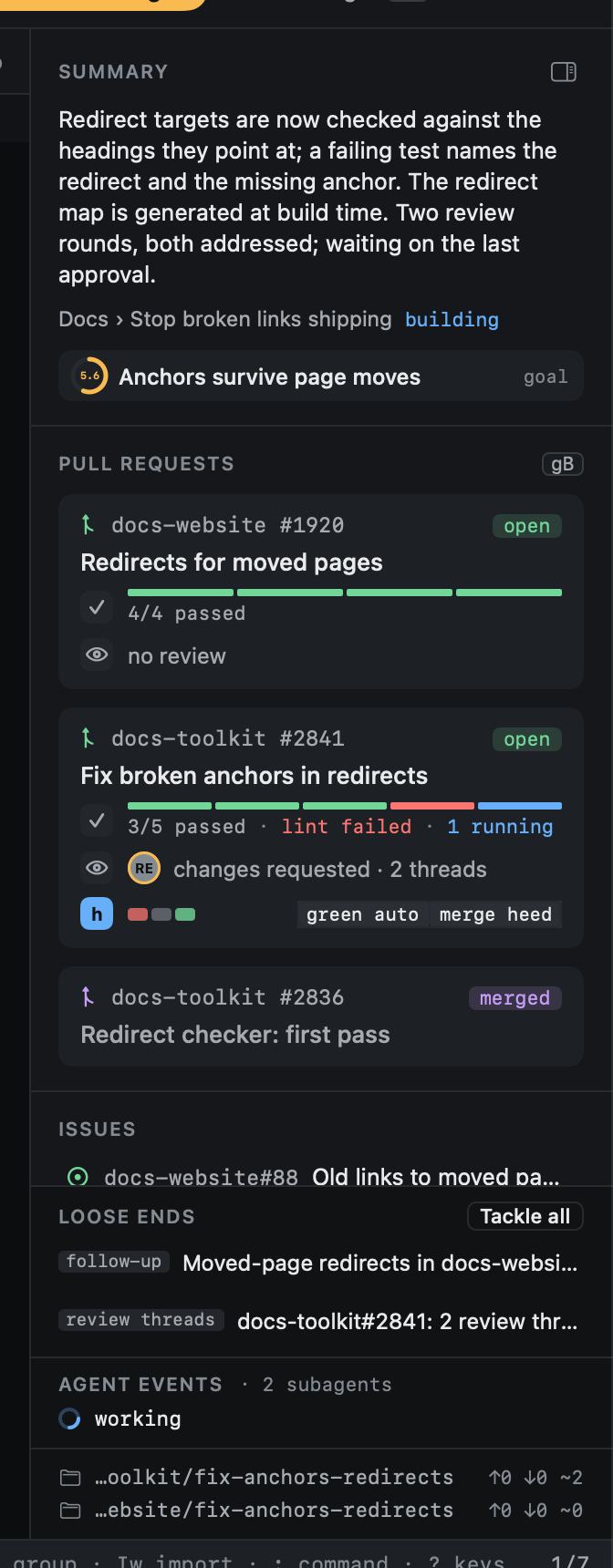
{}jump between cards. - Middle, the PR under the cursor: one line on where the PR stands, its green checklist, its open items, and its timeline, which lists everything heed noticed and did for the PR.
- Right, the merge queues with when each runs next, what cleanup, summaries and goals are doing, and the
activity across all PRs, newest first (
zihides the pane).
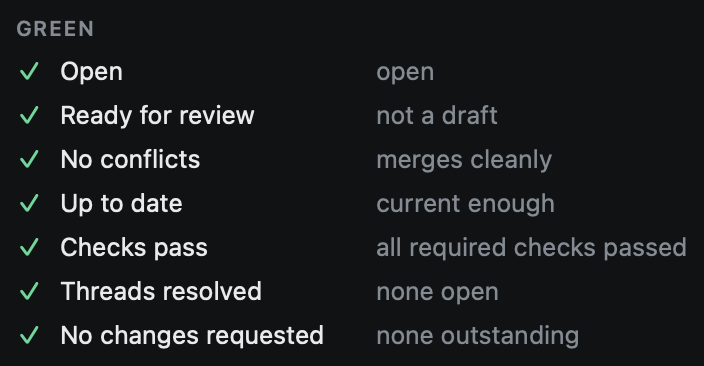
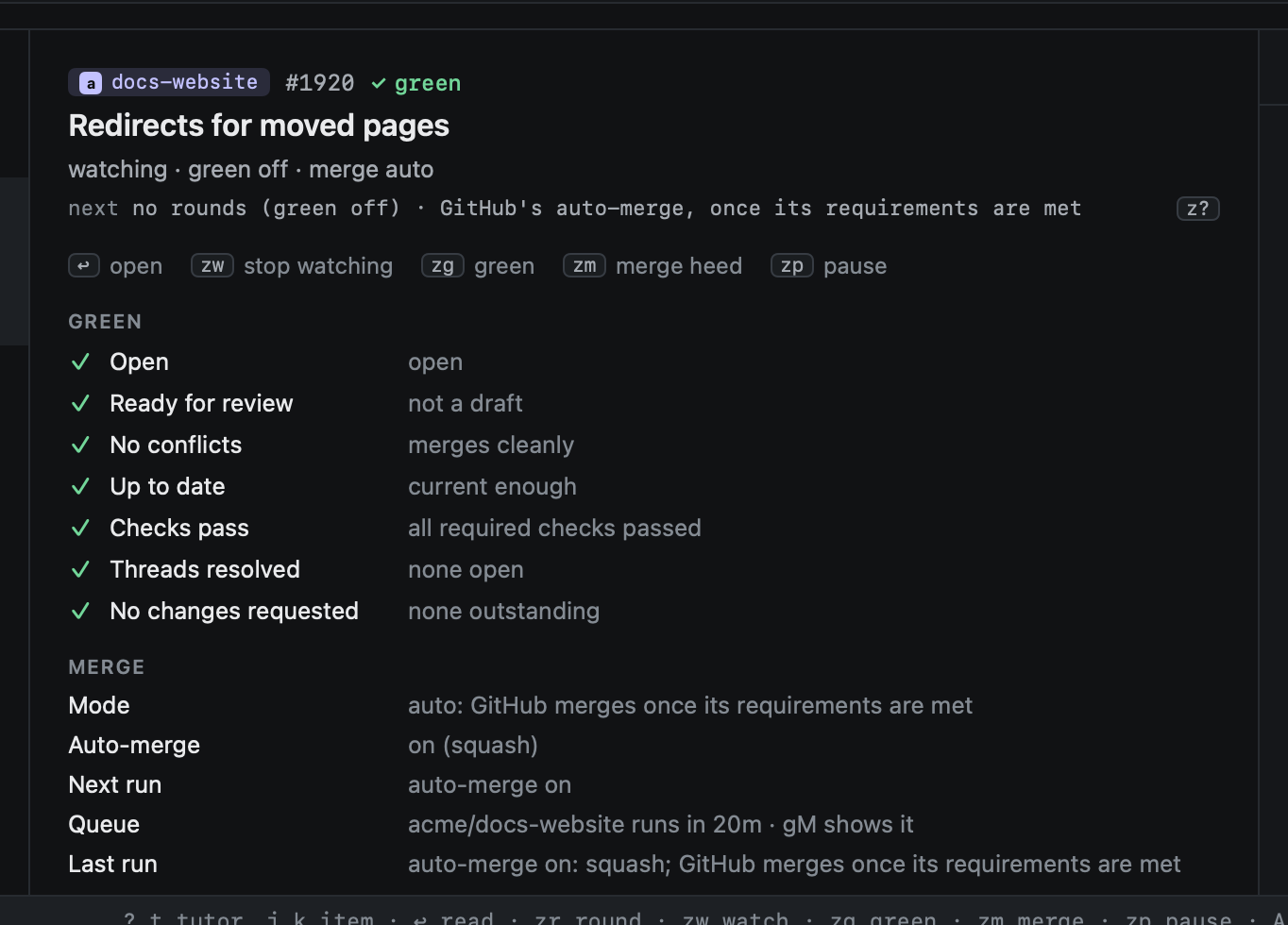
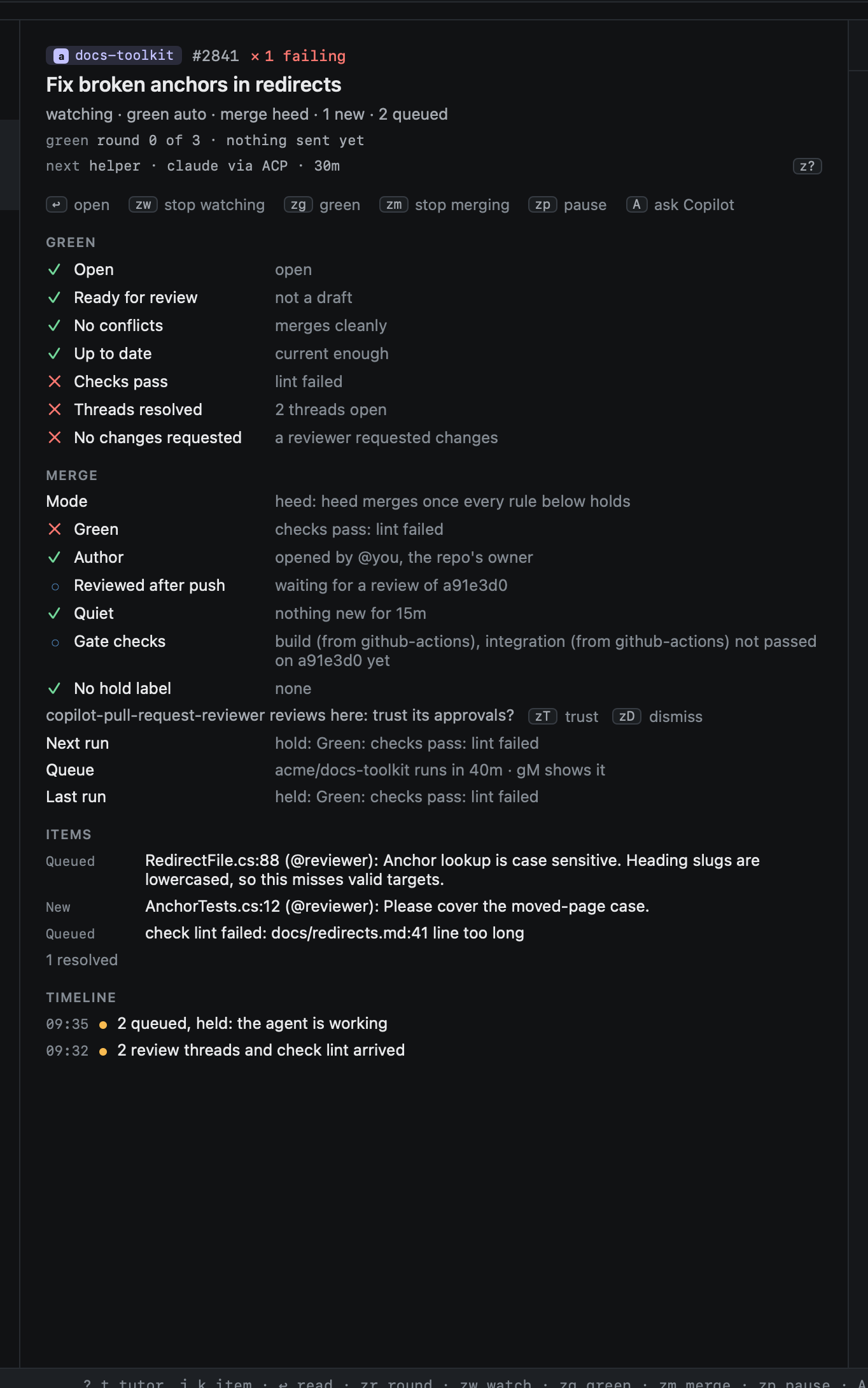
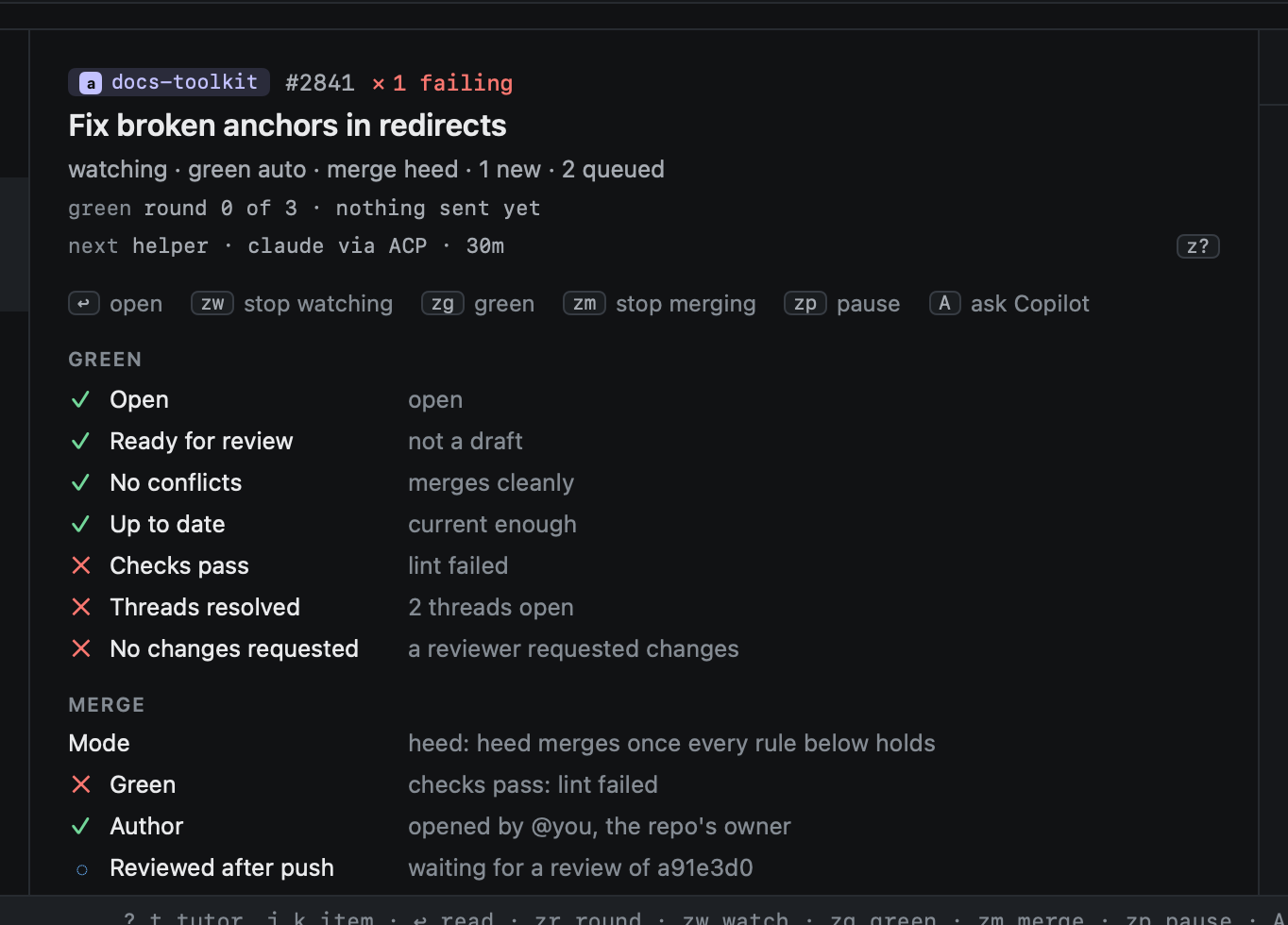
A PR is green when GitHub has nothing left to object to in the code. The middle pane lists each rule with what heed
found, and z? (:pilot.why) lists the rules for the PR you are on (see What heed will do):
| Rule | Holds when |
|---|---|
| Open | not merged or closed |
| Ready for review | not a draft |
| No conflicts | the PR merges cleanly into its base |
| Up to date | not behind the base, when the repo requires branches to be current |
| Checks pass | every required check passed (every check, when the repo requires none) |
| Threads resolved | no review thread is open |
| No changes requested | no reviewer is waiting on changes |
heed sends what holds a PR back to its agent as an item, the same way it sends review comments. The items are a failing check and a conflict ("rebase on main, resolve the conflicts, run the tests and push"). For a failed GitHub Actions check, heed saves the failed step's log and the prompt points the agent at the file. The agent then reads the error rather than just "lint failed".
heed can send merge conflicts and review comments to GitHub's Copilot coding agent instead of your session's agent. The work then spends Copilot's budget rather than your agent's tokens. Two options, off by default, also set per org and per repo:
copilot_conflicts: a PR that conflicts with its base.copilot_comments: new review comments from people who can write to the repo (see Who wrote it);Casks about the others too.
With get it green on (ask or auto), heed asks on the PR, once per conflict and per comment. When both have
something, one comment asks for both:
@copilot Please merge in main and resolve the conflicts, then address these review comments:
RedirectFile.cs:88(@reviewer): Anchor lookup is case sensitive.Make sure the build and tests still pass.
Copilot works in its own environment and pushes to the PR's branch. What heed asked Copilot shows as sent, so your agent does
not get the same items as well. Pull in your session's worktree before its agent pushes again. A in Now (C in the PR
overlay) asks Copilot about the PR you are on, both kinds, whatever the options say.
heed asks only where Copilot can work. heed checks that the repo lists Copilot among those an issue can be assigned to. That is the case when the Copilot coding agent is on for the repo (any paid Copilot plan; on Business and Enterprise an admin enables it). Elsewhere the work goes to your agent as before. Failing checks stay with your agent. A branch that is merely behind belongs to the merge queue.
reviewers names who heed asks to review a PR once it is open and not a draft: logins, teams (org/team), and
copilot for Copilot code review. heed asks each reviewer once per PR, never the PR's author. zv (:pilot.reviewers) asks now.
Each PR has three levels, and each level needs the one before it:
| Level | Off | On |
|---|---|---|
| Watch | only the PR's summary from the regular sync | heed follows it: fetches its review threads and checks as they change, and shows its state everywhere |
| Green | items are shown, nothing is sent | ask: you queue items to send; auto: they go to the agent once it is idle (see review feedback) |
| Merge | nothing is merged | auto: heed turns on GitHub's auto-merge, and GitHub merges once its requirements are met; heed: heed merges once its rules hold (see below) |
Watching only reads from GitHub, so watching is on by default.
zm cycles merging for a PR: off, auto, heed (and turns watching on with it). Each repo with such PRs has a merge queue. A run of the
queue goes through the queue's PRs, oldest first:
| The PR | A run |
|---|---|
| is green | turns GitHub's auto-merge on, with the repo's merge method |
| waits on something GitHub itself requires (a required check, a required review) | turns auto-merge on: GitHub merges once that arrives |
| waits on something GitHub does not hold it for | waits: auto-merge there would merge at once, with checks still running |
| fell behind its base | brings the PR up to date (update_branches) |
| fails a green rule | holds the PR, and turns auto-merge off if it was on: GitHub might merge what the rule catches |
| is paused | holds the PR |
| is a swarm's PR whose task waits for one not merged yet | holds the PR, and turns auto-merge off if it was on |
| was opened by someone who can't write to the repo | holds the PR: see Which PRs heed merges |
A swarm's PRs go through in the swarm's merge order instead, in the places they hold among the other PRs (Landing).
GitHub does the merging, so the repo has to allow auto-merge (Settings ▸ General ▸ Allow auto-merge). The queue says so when the repo does not. heed merges only PRs your sessions track.
heed merges on its own, with auto or heed, only PRs it trusts:
- yours, from any branch;
- on a branch of the repo itself, a PR opened by someone who can write to the repo, or by one of the logins in
trusted_authors, such as["dependabot[bot]", "renovate[bot]"](empty by default).
Someone can write to the repo when GitHub says they are its owner or a collaborator (OWNER, COLLABORATOR), or
when they are a member of the organisation that owns it (MEMBER) and
gh api repos/{owner}/{repo}/collaborators/{login}/permission says write, maintain or admin. Being a member alone
does not count: organisation members can have read access only. heed asks about a member when it fetches the PR and
keeps the answer for ten minutes; until gh answers, or when gh cannot, the member counts as someone who can't write.
A PR from a fork is never merged on its own unless it is yours, whoever opened it: anyone the fork's owner lets push to the fork can change the PR. The same rule decides which PRs heed's runs start on by themselves (helpers), so a PR heed would not merge is also one it does not run your setup on.
The rule holds however the PR came to be tracked: a session's own, heed pr add, or a goal's item source. heed holds
anyone else's PR with the reason (@x isn't a collaborator: heed doesn't merge it on its own, @x opened it from a fork: …), leaves GitHub's auto-merge as it is, and merge now (zM) still merges the PR by hand.
A login ending in [bot] names only the bot of that name, never a person with the same login; without the suffix
it matches either. This holds for trusted_reviewers too.
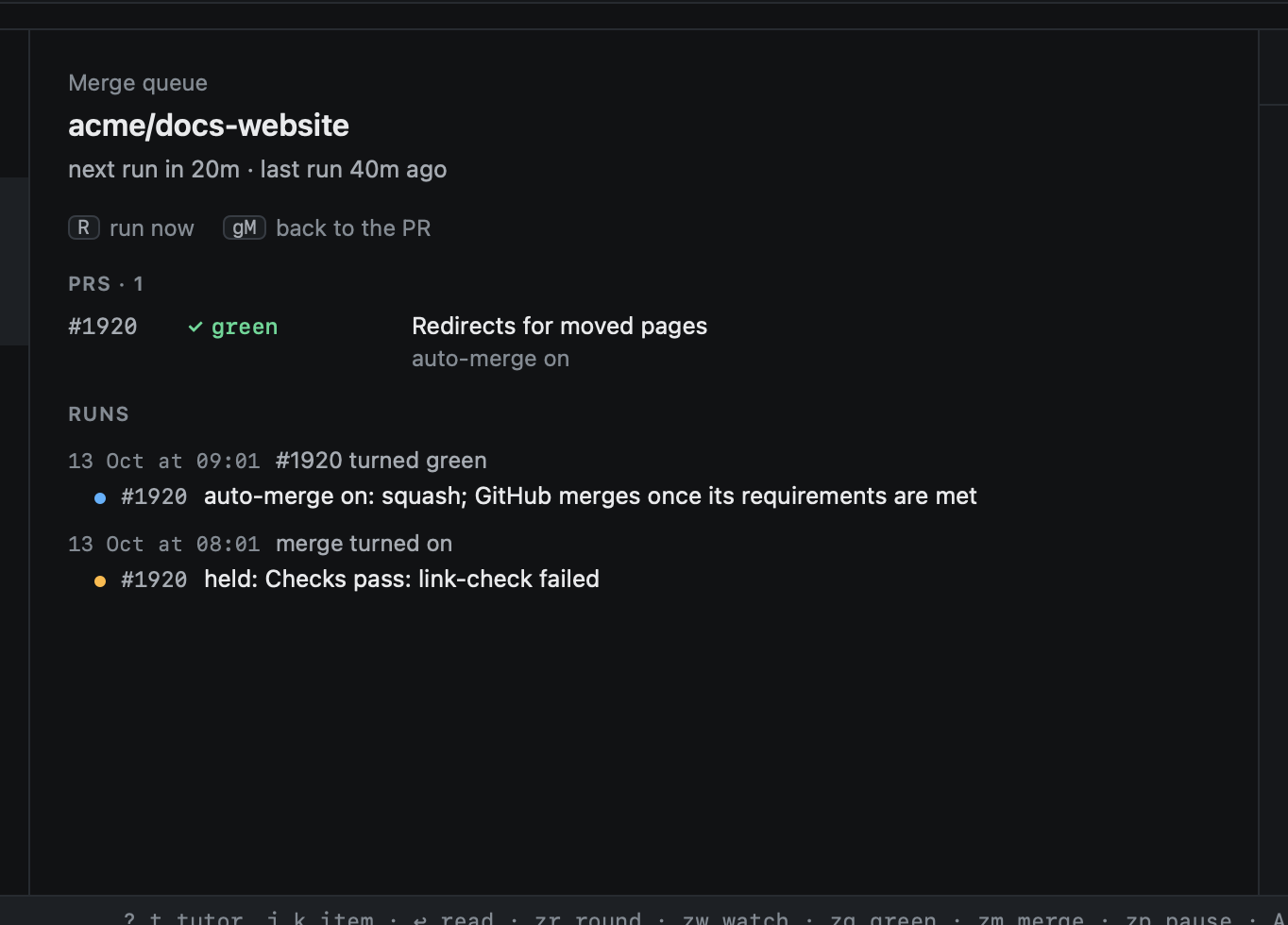
A queue runs every hour (merge_schedule), when merging is turned on, when one of its PRs turns green, and after one of
its PRs merges, so heed brings the other PRs up to date. R in Now runs the PR's queue now, and :merge.run all runs
every queue. gM shows the PR's queue in the middle: its PRs with what the next run does to each, and every run with
what the run did. gM again, or moving the cursor, goes back to the PR.
With merge = "heed", heed does not hand the PR to GitHub's auto-merge (it turns auto-merge off if it is on). heed merges the PR itself,
once every rule holds. A run checks the rules again on the PR as it is then, and merges only that head commit
(--match-head-commit). A push in between holds the PR for the next run.
| Rule | Holds when |
|---|---|
| Green | every green rule holds |
| Author | the PR is yours, or from a branch of the repo by someone who can write to it or one of trusted_authors (above) |
| Reviewed after push | someone who can write to the repo approved the head commit, or a trusted reviewer reviewed it (below) |
| Quiet | no new commit or review for quiet_minutes (5) |
| Gate checks | every check named in gate_checks passed on the head commit, from its app, required by GitHub or not (below) |
| No hold label | none of hold_labels (hold, do-not-merge, wip) is on the PR |
| Self-review | with self_review set: the command approved the diff of the head commit, run with its tools off |
An approval of the head commit counts when the reviewer can write to the repo (the owner, a collaborator, or an
organisation member gh says has write access, as above), or is one of trusted_reviewers.
A member listed in trusted_reviewers counts as configured, without the permission check. Anyone else's approval is
shown and does not count: the rule says @x approved abc1234, but isn't a collaborator, for a member without write
access but is an organisation member gh hasn't said can write to the repo, or for a bot, but isn't in trusted_reviewers.
A trusted reviewer (trusted_reviewers, e.g. copilot-pull-request-reviewer) counts as a review of the head
commit in three cases. The reviewer approved the commit, or left a comment review none of whose threads is still open.
Otherwise the reviewer left no review at all, but every gate check, its review check among them, passed on that commit.
When a bot reviews a repo's PRs (GitHub says the reviewer is a bot, its login ends in [bot], or the reviewer is
Copilot's) and is not in that repo's trusted_reviewers, the Merge section of a PR heed merges asks in Now:
copilot-pull-request-reviewer reviews here: trust its approvals? zT (:pilot.reviewers.trust) adds the bot to
trusted_reviewers under [repos."org/name"], as name[bot]; zD (:pilot.reviewers.dismiss) stops heed asking
about the bot for that repo. heed never adds a reviewer by itself. zv mentions the first suggestion too.
A gate check is a check's name and the app that reported the check. "github-actions:ci/test" names the app; a bare
"ci/test" takes the app that reports a check of that name on the base branch's latest commit, or github-actions
when no app does there. A check of the same name from another app neither passes nor fails the gate. heed reads the
part before the first : as an app when the part looks like one (lowercase letters, digits and -), so a check named
lint:docs is written "github-actions:lint:docs".
On a PR heed does not merge on its own (above) no gate check counts: the checks on such a PR can run workflow files the PR itself changes.
The self-review is a command you choose, such as claude -p. heed passes the command a prompt with the PR's
description and diff on stdin, in an empty folder of its own. The diff is of the head commit the verdict is recorded
for (gh api repos/{owner}/{repo}/compare/{base}...{head}, nothing is checked out), so the commit the self-review
approved is the one heed merges (--match-head-commit).
The command runs with its agent's tools off: for claude heed adds --tools '' --strict-mcp-config, and for pi
--no-tools --no-extensions --no-mcp. heed finds the agent after a leading env, NAME=value assignments, and a
package runner (npx, bunx, pnpx or pnpm dlx) running @anthropic-ai/claude-code, so
env CLAUDE_CONFIG_DIR=~/.claude-review claude -p works. A command that names --tools itself runs as written. Any
other command, codex among them (its read-only sandbox still runs shell commands), does not run: the Self-review rule
fails with not run: and the reason, in the Watch view and the merge queue's log, and the PR waits until
self_review names claude or pi. The first line of the answer, with markdown such as ** or
# trimmed, must be exactly APPROVE to merge. REQUEST_CHANGES: <why> holds the PR with that reason, and any other
line holds the PR as a refusal that quotes the line. The self-review runs last, once every other rule holds, and once
per head commit.
After merging, heed comments on the PR with each rule and what heed found. When GitHub refuses the merge (branch
protection), heed holds the PR with GitHub's reason. admin_merge = true under [repos."org/name"], and only there, retries
with --admin, and only when every rule above held on the commit heed merges.
With merging off, heed still checks whether a PR it has fetched could be merged. The PR must be open, not a draft, with no conflicts, up to
date when the repo requires it, its required checks passed, approved (or no review required), nothing else blocking it
on GitHub, no open threads, none of hold_labels, quiet for quiet_minutes, and GitHub's auto-merge not already on.
When every condition holds, the PR's card, its sidebar row and the PRs view say Ready to merge, and the PR shows in
Attention as ready to merge. You have two actions from there, by key or by click:
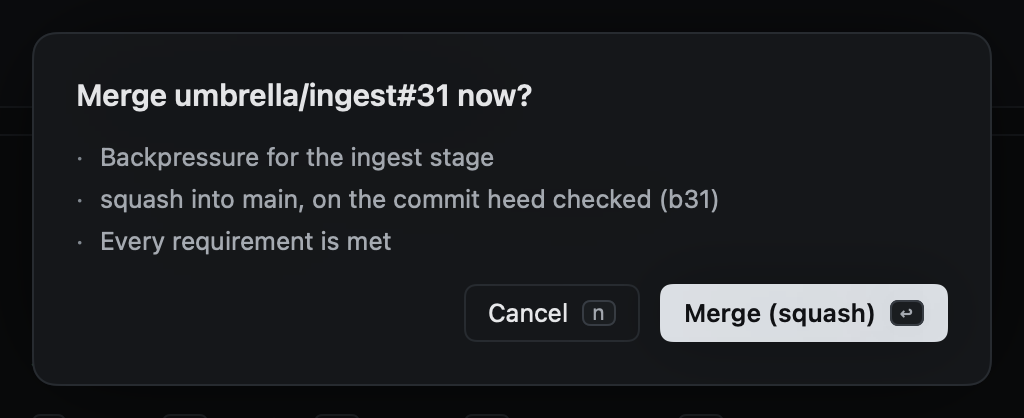
- merge now (
zM,:pilot.merge.now):gh pr mergewith the PR's method, on the head commit heed checked.merge_now = "ask"(the default) first shows the PR, the method and anything not met, and"auto"merges at once. Merge now works on any open PR GitHub would take. heed names its own waits (quiet, open threads, auto-merge on) and skips them. - set up merging: Settings › Orgs & repos on the PR's repo, where
mergeand the rules above are set.
Sometimes the unmet condition is something GitHub enforces (a required review, a required check, being up to date). If you are an
admin of the repo, merge now then offers a force merge with --admin instead. force_merge = "ask" (the default) lists
exactly what heed bypasses first, "auto" does not ask, and "off" never offers a force merge. heed never bypasses a draft, conflicts or a hold label.
admin_merge is separate: it applies only to heed's own merges with merge = "heed".
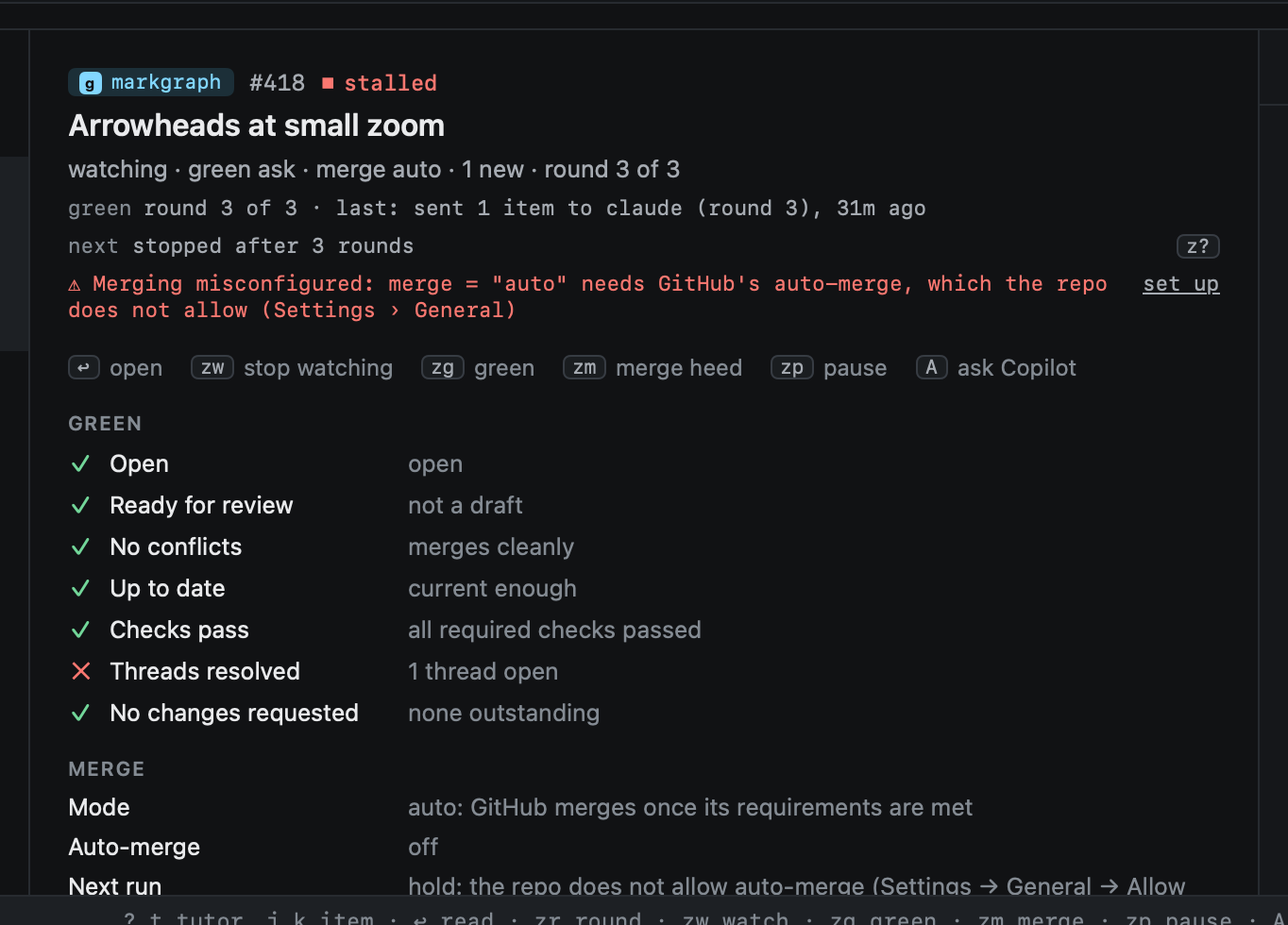
heed works out ahead of time whether a repo's merge settings can work, from what heed already fetches about the repo.
The misconfigurations are merge = "auto" where the repo does not allow auto-merge, a merge_method the repo does not allow, merge commits where
the base branch requires linear history, and admin_merge where you are not an admin. A PR in such a repo says
Merging misconfigured with the reason, instead of heed holding the PR at the next run.
Settings come from three levels and a choice made on the PR, so the next round is not always plain. Every PR card, in the inspector and in Now's middle pane, says the next round in one line under the pilot's:
next helper · claude via ACP · 30m: a helper (the default), with the agent the helper runs over ACP and how long the helper may work.next background run · codex · 30m · 1 instruction: a run of its own, with the agent and model heed starts, how long the run may work, and how many lines ofgreen_instructionsthe run gets.next conflict run · …: the PR conflicts with its base, so the round takesmerge_agentandmerge_model.next typed into the session's claude:run_in = "session".next Copilot is asked to resolve the conflicts:copilot_conflicts.next no rounds (green off) · GitHub's auto-merge, once its requirements are met: get it green is off and merging is on, so heed sends no round but still merges the PR.next nothing: get it green is off,paused until 14:00,stopped after 3 rounds: these say why heed sends no round.
Above that line, green round 1 of 3 · last: sent 2 items to claude (round 1), 31m ago says how far get it green is and what
heed sent last. The pilot's line itself names both modes, watching · green ask · merge off.
Hover the line to see each setting behind it and where its value comes from: default, org <name>, repo, or
this PR for a choice made with zw, zg or zm.
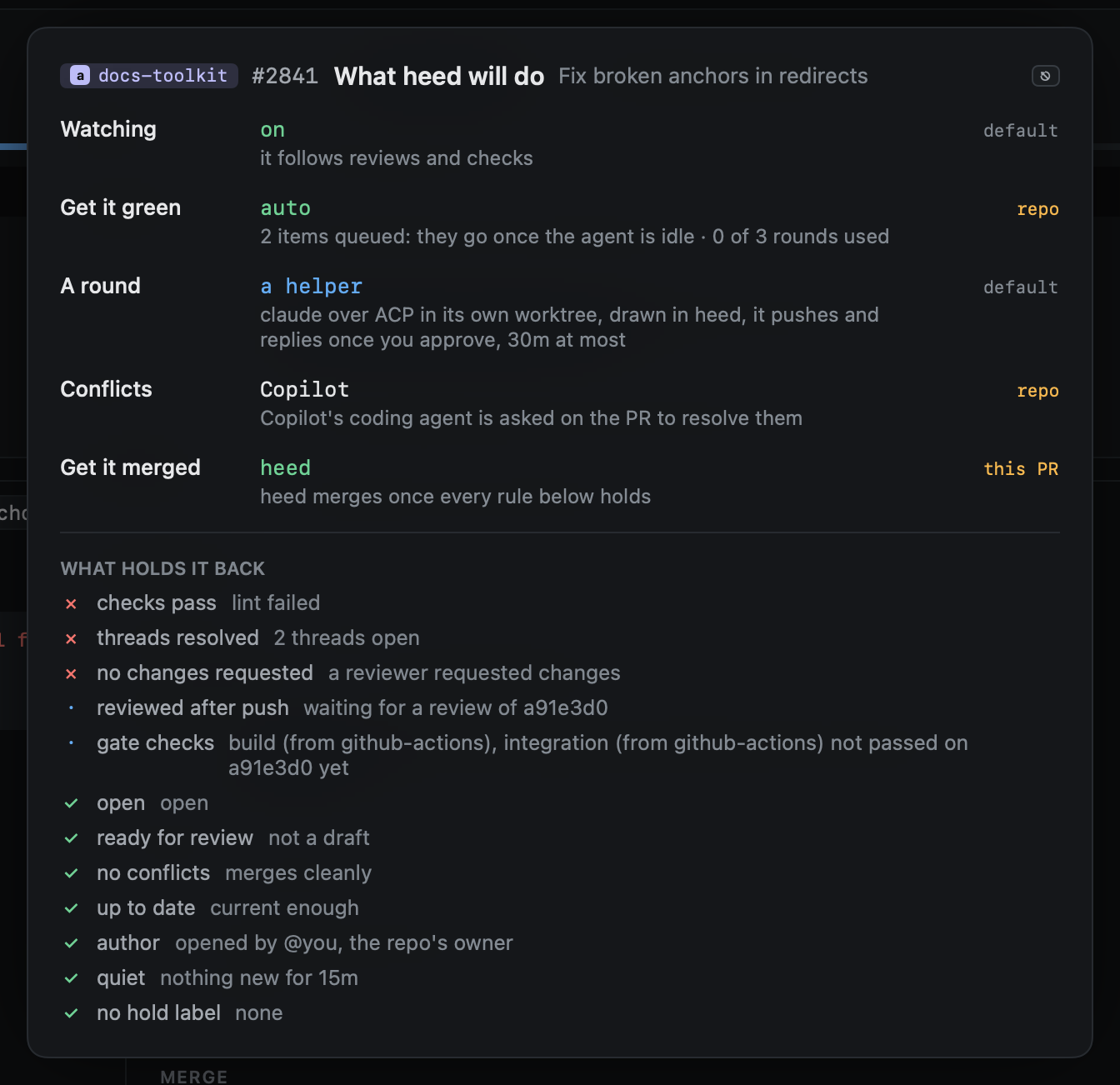
z? (:pilot.why), or a click on its key cap, opens the whole picture for the PR you are on. In Now and the PRs view that is the PR under the cursor,
in the PR overlay it is the overlay's PR, and in Sessions it is the session's first PR. The picture has one row each for Watching, Get it green, A
round, Conflicts and Get it merged: Each row shows the value, what the value means for this PR now, and on the right where it comes
from, amber when it is not the default. Below the rows, what holds it back lists the green rules and, with
merge = "heed", heed's merge rules, failures first (✕), then what is still pending (·), then what passes (✓).
j k scroll the picture, and ⎋ closes it.
| Key | |
|---|---|
↩ |
Read the PR (PR overlay) |
zw |
Watch or stop watching |
zg |
Cycle green: off, ask, auto |
zm |
Cycle merging: off, auto, heed |
zM |
Merge now (force merge with --admin where you are an admin and GitHub's requirements are unmet) |
A |
Ask Copilot to resolve the PR's merge conflicts and address its review comments (C in the PR overlay) |
zr |
Another round for a stalled PR |
zp |
Pause or resume |
z? |
What heed will do for the PR, and what holds it back |
zv |
Ask the PR's reviewers now |
zT zD |
In Now: trust the bot heed suggests for trusted_reviewers, or stop suggesting it |
gv |
Go to the session's running run |
zx |
Stop the session's running run |
v |
Select several, then zp pauses or resumes them all |
r |
Sync now |
R |
Run the PR's merge queue now |
gM |
Show the PR's merge queue |
The pilot keys are the same everywhere. In Now, the PRs view and the PR overlay they act on that PR, and in Sessions they act on every PR the session tracks. A choice made with the keys sticks to that PR. PRs you never set follow the settings.
Get it green never types into your session's agent. By default each round goes to a helper. A round starts when heed sends on its own with
green = "auto", when you press zg with items queued, or when you press D on the PR in Attention. The helper is an
agent heed starts over ACP in a worktree of its own. heed draws the helper in Attention under the reader, in Autopilot › Now
as a live tile, and under the session's panes with gW. The helper pushes and replies only once you approve its close-out.
Each PR has one helper at a time, and heed sends what queues meanwhile once you close out the helper. heed tells the session tracking the PR on a
line at the foot of its panes and never types into the session.
run_in = "background" (per org and repo too, or Runs in on the Autopilot page) keeps the way rounds ran before
helpers, for an agent that heed has no ACP adapter for. Each round is a run in the background:
- Where: a worktree of its own (
<worktree_root>/heed/<repo>/get-it-green-<branch>) on a branch of its own,heed/get-it-green/<branch>, tracking the PR's. Conflicts with the base getheed/get-it-merged/…. - Which agent: the agent that
[pilot] agentnames, on[pilot] modelandeffort(all per org and repo too), or the session's agent when unset. You can spend the tokens of an agent you don't use for real work. Settings picks the model and effort from the agent's list, or a custom id. - Conflicts: a get it merged run (conflicts with the base) takes
merge_agent,merge_modelandmerge_effortwhen set. Merging is usually simple work, so a cheaper agent or model often does it. Unset, the run uses the run agent, model and effort. - What it's told: to fix what is listed, commit, and push to the PR with
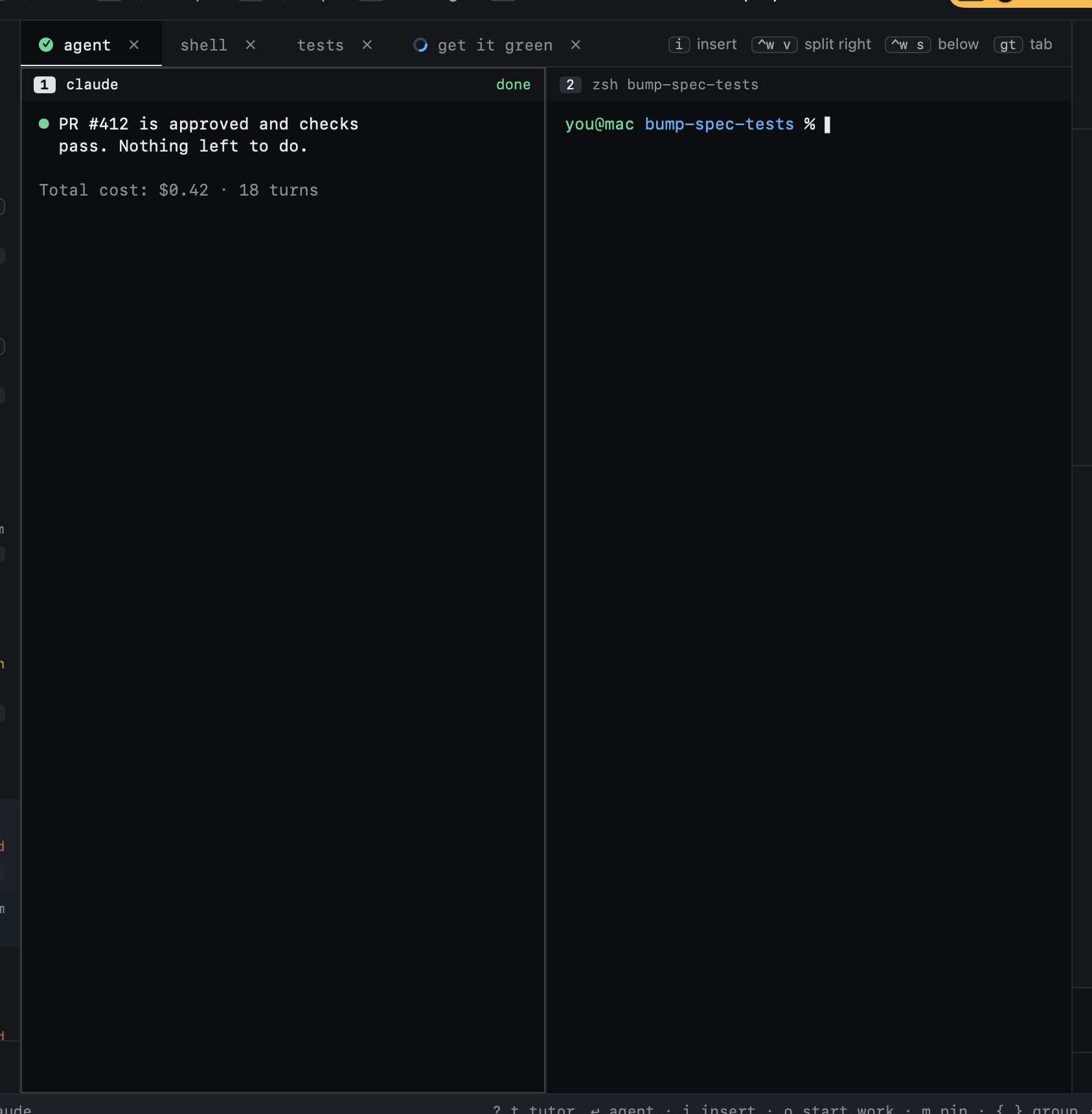
git push origin HEAD:<branch>. - The tab: heed appends the tab next to the session's own and names it get it green (or get it merged). The tab never takes your
focus. Its glyph in the tab strip is the run's state, and
gv(:pilot.run) goes to the tab.zx(:pilot.run.stop) stops the run, as closing its tab does.
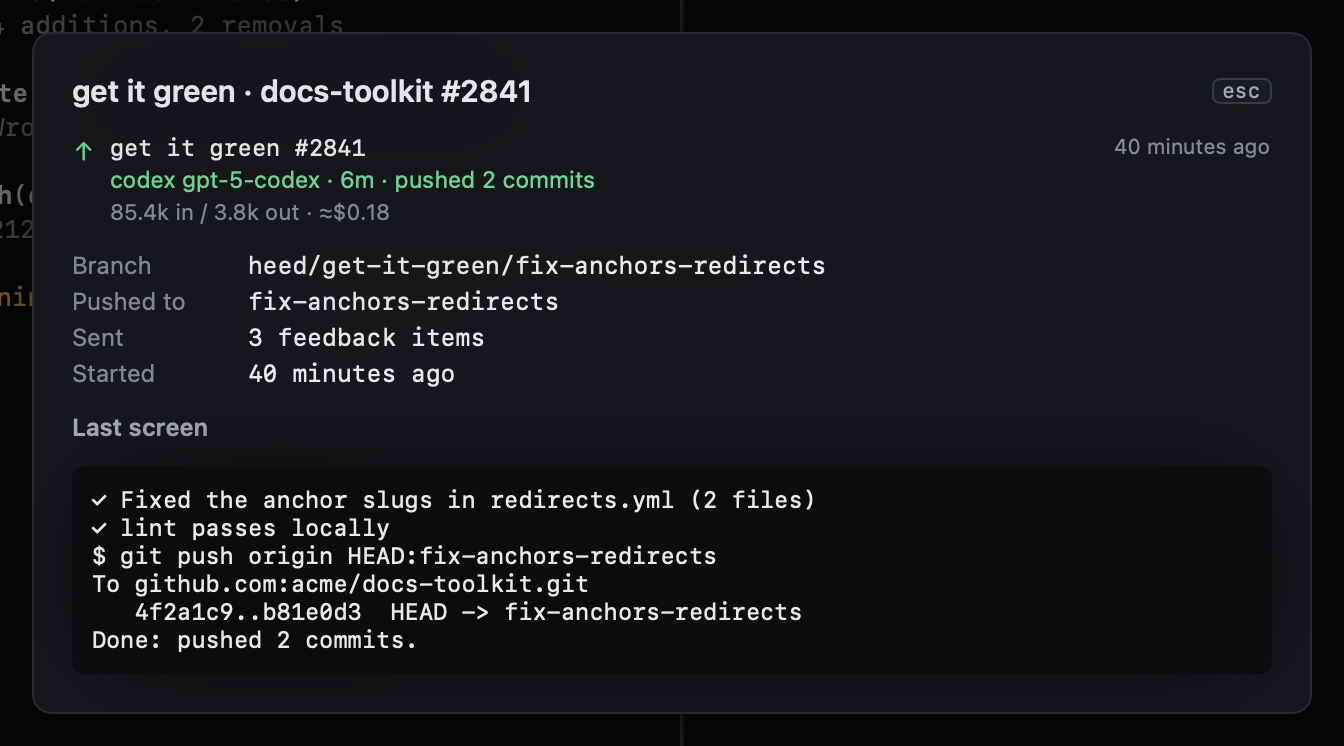
While the run works, it shows in three places: a row under its session in the sidebar (the goal and PR, how long, its agent
and the last line of its screen), a box on the PR's card in the inspector (also with the round and the key to its tab),
and the PR's line in Now (a codex run is on it (4m)). Clicking the row or the box goes to its tab.
When the run's agent finishes its turn (or exits, or runs past run_timeout), the run ends at once:
- heed keeps the run's last screen;
- heed records what the run did: pushed N commits, no changes, timed out, or stopped (you closed its tab, or
zx); - heed removes the run's tab, worktree and
heed/…branch; - heed brings your session's worktree up to what the run pushed, when the worktree has no changes of its own.
The next failing check or review starts a fresh run. Each PR has one run at a time, and rounds still count
toward max_rounds. A run that asks something, or is blocked on a permission, puts its session in Needs you.
The inspector lists the session's runs, newest first. Click a run to read what it did and its last screen. Clicking a running run takes you to its tab.
run_in = "session" (per org and repo too, or Runs in on the Autopilot page) sends each round to the session's own
agent instead, as one prompt typed into its pane. heed waits until that agent is idle or done, and never sends while the agent works,
is blocked or asks. heed also waits until you have not typed in the pane for five minutes (20 seconds after zg). A Claude session gets
the prompt through its inbox instead, which holds the prompt until the agent can read it. The five minutes
still apply. heed makes no worktree, branch or
tab. Use this mode where a fresh worktree gets in the way, such as an agent that asks to trust every new folder.
heed sends nothing for a PR once the PR is merged or closed, in either mode.
If heed quits mid-run, or a removal fails, a heed/… branch and its worktree can be left behind. Every cleanup
(and launch) removes them when it's safe: no uncommitted changes, and nothing that isn't on the PR's
branch. Otherwise heed keeps them and says why. From a terminal, heed cleanup runs does the same in the repo you are
in, and also skips anything git touched in the last hour. Since every run branch starts with heed/, a script can
find them too:
git for-each-ref --format='%(refname:short)' 'refs/heads/heed/'
Get it green sends up to max_rounds prompts (3) without a new approval. Then get it green stops, and the PR is stalled.
A stalled PR shows first in Now and in its own group in the sidebar, in red, with how many rounds it used.
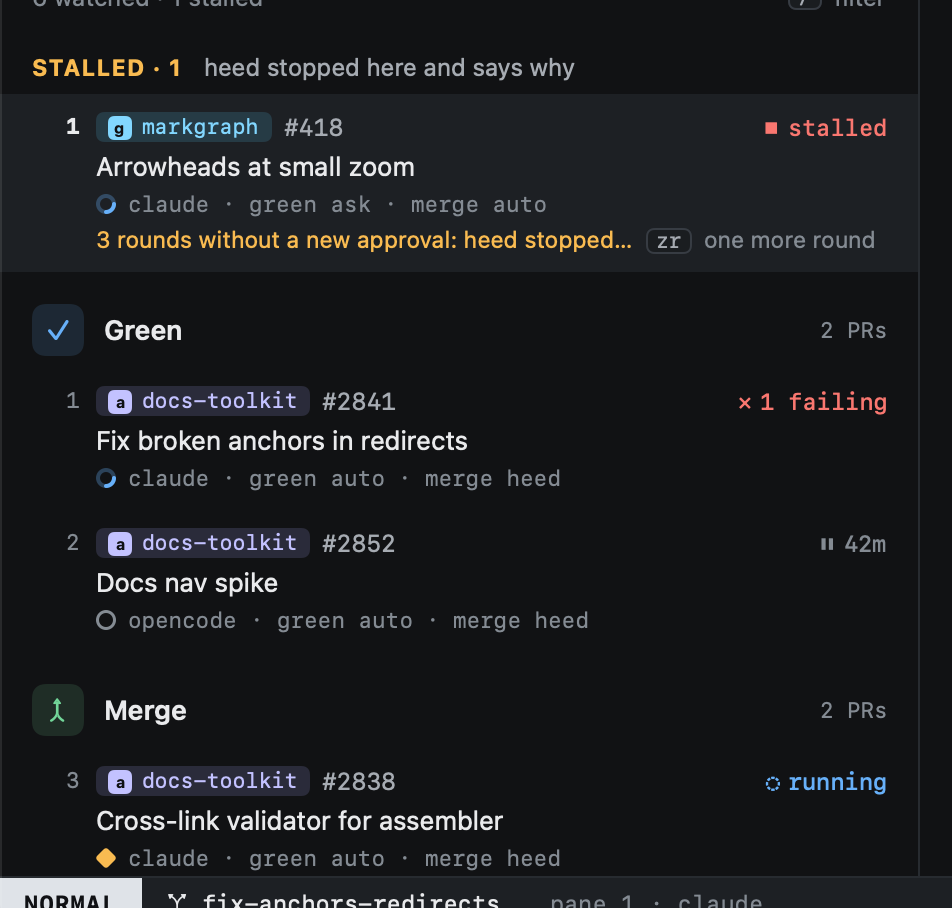
A new approval starts the count again. zr gives the PR one more round now. heed sends what is open (on auto), and
stops again if that round brings no approval either. A stalled PR does not count toward what needs you in the Dock and the
menu bar, because the PR waits on a reviewer.
A paused PR stays watched and heed keeps its state up to date. heed sends nothing for the PR, the PR does not count as
needing you, and its merge queue leaves it alone. zp pauses for an hour ([pilot] pause). :pilot.pause 4h, :pilot.pause forever and
:pilot.pause off choose another length. The countdown shows on the row, and the pause ends by itself.
heed shows the same state wherever a PR appears: next to a session's PR count in the sidebar, on the inspector's PR card, in the PRs view's Watch column, and by the PR number in Repos.
The settings live in [pilot] (the pilot is what does the watching and the merging). [pilot] sets the
defaults, and an org or a repo overrides any of them. Settings ▸ Autopilot edits the defaults. Settings ▸ Orgs & repos
edits the overrides, on its Get it green, Get it merged and Reviews tabs.
[pilot]
watch = true
green = "ask"
max_rounds = 3
agent = ""
model = ""
effort = ""
run_in = "helper"
merge_agent = ""
merge_model = ""
merge_effort = ""
run_timeout = "30m"
pause = "1h"
merge = "off"
merge_schedule = "1h"
update_branches = true
copilot_conflicts = false
copilot_comments = false
reviewers = []             # e.g. ["copilot", "alice", "acme/docs-team"]
quiet_minutes = 5          # merge = "heed": the rules
trusted_reviewers = []     # e.g. ["copilot-pull-request-reviewer"]
trusted_authors = []       # whose PRs are merged besides collaborators, e.g. ["dependabot[bot]"]
gate_checks = []           # e.g. ["github-actions:test"], or "test" from the app the base branch has it from
hold_labels = ["hold", "do-not-merge", "wip"]
# self_review = "claude -p"
# merge_method = "squash"
merge_now = "ask"
force_merge = "ask"
# Extra instructions, added to what heed sends (see below)
# green_instructions = "Resolve the review threads your changes addressed, and any that no longer apply."
# review_instructions = ""
# start_instructions = ""
# summary_instructions = ""
# summary_sign_off = false

[orgs.employer]
watch = false

[repos."employer/main-service"]
admin_merge = true
watch = true
green = "auto"
merge = "auto"
- read-only, so on
- off, ask or auto
- prompts without a new approval before it stops
- runs' agent (codex, claude, ...); empty: the session's
- their model (haiku, gpt-6-luna, ...); empty: the agent's default
- their reasoning effort (low, high, ...); empty: the agent's default
- helper (an ACP agent in its own worktree), background (a tab of its own) or session
- background runs for merge conflicts; empty: agent
- their model; empty: model (with a merge_agent of its own, that agent's default)
- their effort; empty: effort (with a merge_agent of its own, that agent's default)
- a run still working after this long is stopped
- what zp pauses for
- off, auto or heed
- how often a repo's queue runs, or manual
- Copilot resolves merge conflicts
- Copilot addresses review comments
- unset: the first of squash, merge, rebase the repo allows
- zM: ask first, or auto (merge at once)
- merging now past required reviews/checks with --admin, as an admin: off, ask, auto
- ask agents to end with a heed-summary: line (see History › Ledger)
- not this org's PRs, by default
- per repo only: retry a refused heed merge with --admin
- but this repo's, yes
heed's prompts can carry instructions of your own, set in [pilot] and per org or repo like any other setting
(Settings ▸ Autopilot ▸ Extra instructions):
| Key | Added |
|---|---|
green_instructions |
after the feedback items that each get it green run gets |
review_instructions |
to what the self-review looks for, before the PR's description and diff |
start_instructions |
after the issue text Start work begins from, before the Closes lines |
summary_instructions |
to what heed asks for when its model calls summarize work |
summary_sign_off, beside them, asks the agent itself for a one-line summary at the end of its work. See
The agent's own summary.
These instructions add to a prompt and never replace it. What heed relies on stays as it is, such as the push command a run is
given and the APPROVE line heed reads from the self-review. They are not a stand-in for the repo's own AGENTS.md or
CLAUDE.md either, which the agent still reads. Use the instructions for what you want from heed's prompts in particular, such as
"resolve the threads that no longer apply". A repo's "" clears what its org adds.